Network Scanner is an IP scanner for scanning both large corporate networks with hundred thousands of computers and small home networks with several computers. The program can scan both a list of IP addresses or computers and ranges of IP addresses. The number of computers and subnets is not limited.
Network Scanner by LizardSystems
Posted in Network Scanner, Software.
– January 14, 2010
Disk2vhd v1.0
Introduction
Disk2vhd is a utility that creates VHD (Virtual Hard Disk – Microsoft’s Virtual Machine disk format) versions of physical disks for use in Microsoft Virtual PC or Microsoft Hyper-V virtual machines (VMs). The difference between Disk2vhd and other physical-to-virtual tools is that you can run Disk2vhd on a system that’s online. Disk2vhd uses Windows’ Volume Snapshot capability, introduced in Windows XP, to create consistent point-in-time snapshots of the volumes you want to include in a conversion. You can even have Disk2vhd create the VHDs on local volumes, even ones being converted (though performance is better when the VHD is on a disk different than ones being converted).
Posted in Administration tools, Software.
– October 9, 2009
Find MAC Address
Find MAC Address is a tool for finding the MAC address of computers on the network.
This tool is an easy way to find the MAC address of a local or remote computer on the network. Select the target and method and find the MAC address of a remote computer on the network. The software can not only find the MAC address of a computer, but also lookup the manufacturer of its network card.
Posted in Networking Tools.
– September 17, 2009
Remote Process Explorer
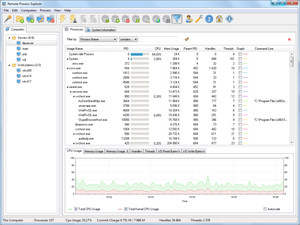
Remote Process Explorer is a powerful tool for managing, monitoring and analyzing processes on a local or remote computer. You can use Remote Process Explorer to not only get the list of processes running on a remote or local computer, but also run a new process, kill a process or change its priority. In real time, Remote Process Explorer monitors the performance of a remote computer, shows what processes are running on it, how much CPU, memory and other system resources they use. It will show hidden processes, which will allow you to detect spyware and malware. The program has additional tools for shutting down/restarting/logging off a remote computer, sending messages to it, calling standard administration tools. Remote Process Explorer is an advanced tool for administering remote computers.
Posted in News.
– August 12, 2009
Retrieving System Information (WMI: Win32_OperatingSystem, VBScript)
On Error Resume Next
Const wbemFlagReturnImmediately = &h10
Const wbemFlagForwardOnly = &h20
arrComputers = Array("localhost")
For Each strComputer In arrComputers
WScript.Echo
WScript.Echo "=========================================="
WScript.Echo "Computer: " & strComputer
WScript.Echo "=========================================="
Set objWMIService = GetObject("winmgmts:\\" & strComputer & "\root\CIMV2")
Set colItems = objWMIService.ExecQuery("SELECT * FROM Win32_OperatingSystem", WQL", wbemFlagReturnImmediately + wbemFlagForwardOnly)
For Each objItem In colItems
WScript.Echo "BootDevice: " & objItem.BootDevice
WScript.Echo "BuildNumber: " & objItem.BuildNumber
WScript.Echo "BuildType: " & objItem.BuildType
WScript.Echo "Caption: " & objItem.Caption
WScript.Echo "CodeSet: " & objItem.CodeSet
WScript.Echo "CountryCode: " & objItem.CountryCode
WScript.Echo "CreationClassName: " & objItem.CreationClassName
WScript.Echo "CSCreationClassName: " & objItem.CSCreationClassName
WScript.Echo "CSDVersion: " & objItem.CSDVersion
WScript.Echo "CSName: " & objItem.CSName
WScript.Echo "CurrentTimeZone: " & objItem.CurrentTimeZone
WScript.Echo "DataExecutionPrevention_32BitApplications: " & objItem.DataExecutionPrevention_32BitApplications
WScript.Echo "DataExecutionPrevention_Available: " & objItem.DataExecutionPrevention_Available
WScript.Echo "DataExecutionPrevention_Drivers: " & objItem.DataExecutionPrevention_Drivers
WScript.Echo "DataExecutionPrevention_SupportPolicy: " & objItem.DataExecutionPrevention_SupportPolicy
WScript.Echo "Debug: " & objItem.Debug
WScript.Echo "Description: " & objItem.Description
WScript.Echo "Distributed: " & objItem.Distributed
WScript.Echo "EncryptionLevel: " & objItem.EncryptionLevel
WScript.Echo "ForegroundApplicationBoost: " & objItem.ForegroundApplicationBoost
WScript.Echo "FreePhysicalMemory: " & objItem.FreePhysicalMemory
WScript.Echo "FreeSpaceInPagingFiles: " & objItem.FreeSpaceInPagingFiles
WScript.Echo "FreeVirtualMemory: " & objItem.FreeVirtualMemory
WScript.Echo "InstallDate: " & WMIDateStringToDate(objItem.InstallDate)
WScript.Echo "LargeSystemCache: " & objItem.LargeSystemCache
WScript.Echo "LastBootUpTime: " & WMIDateStringToDate(objItem.LastBootUpTime)
WScript.Echo "LocalDateTime: " & WMIDateStringToDate(objItem.LocalDateTime)
WScript.Echo "Locale: " & objItem.Locale
WScript.Echo "Manufacturer: " & objItem.Manufacturer
WScript.Echo "MaxNumberOfProcesses: " & objItem.MaxNumberOfProcesses
WScript.Echo "MaxProcessMemorySize: " & objItem.MaxProcessMemorySize
WScript.Echo "Name: " & objItem.Name
WScript.Echo "NumberOfLicensedUsers: " & objItem.NumberOfLicensedUsers
WScript.Echo "NumberOfProcesses: " & objItem.NumberOfProcesses
WScript.Echo "NumberOfUsers: " & objItem.NumberOfUsers
WScript.Echo "Organization: " & objItem.Organization
WScript.Echo "OSLanguage: " & objItem.OSLanguage
WScript.Echo "OSProductSuite: " & objItem.OSProductSuite
WScript.Echo "OSType: " & objItem.OSType
WScript.Echo "OtherTypeDescription: " & objItem.OtherTypeDescription
WScript.Echo "PlusProductID: " & objItem.PlusProductID
WScript.Echo "PlusVersionNumber: " & objItem.PlusVersionNumber
WScript.Echo "Primary: " & objItem.Primary
WScript.Echo "ProductType: " & objItem.ProductType
WScript.Echo "QuantumLength: " & objItem.QuantumLength
WScript.Echo "QuantumType: " & objItem.QuantumType
WScript.Echo "RegisteredUser: " & objItem.RegisteredUser
WScript.Echo "SerialNumber: " & objItem.SerialNumber
WScript.Echo "ServicePackMajorVersion: " & objItem.ServicePackMajorVersion
WScript.Echo "ServicePackMinorVersion: " & objItem.ServicePackMinorVersion
WScript.Echo "SizeStoredInPagingFiles: " & objItem.SizeStoredInPagingFiles
WScript.Echo "Status: " & objItem.Status
WScript.Echo "SuiteMask: " & objItem.SuiteMask
WScript.Echo "SystemDevice: " & objItem.SystemDevice
WScript.Echo "SystemDirectory: " & objItem.SystemDirectory
WScript.Echo "SystemDrive: " & objItem.SystemDrive
WScript.Echo "TotalSwapSpaceSize: " & objItem.TotalSwapSpaceSize
WScript.Echo "TotalVirtualMemorySize: " & objItem.TotalVirtualMemorySize
WScript.Echo "TotalVisibleMemorySize: " & objItem.TotalVisibleMemorySize
WScript.Echo "Version: " & objItem.Version
WScript.Echo "WindowsDirectory: " & objItem.WindowsDirectory
WScript.Echo
Next
Next
Function WMIDateStringToDate(dtmDate)
WScript.Echo dtm:
WMIDateStringToDate = CDate(Mid(dtmDate, 5, 2) & "/" & _
Mid(dtmDate, 7, 2) & "/" & Left(dtmDate, 4) _
& " " & Mid (dtmDate, 9, 2) & ":" & Mid(dtmDate, 11, 2) & ":" & Mid(dtmDate,13, 2))
End Function
– September 12, 2008